Production-ready CMM routines, on demand
PC-DMIS is the most widely deployed CMM software on earth — Hexagon puts the install base north of 70,000 seats. That ubiquity cuts two ways. It means almost any shop with a coordinate measuring machine can probably run a PC-DMIS routine, but it also means that when the one person who actually writes those routines is out, the machine quietly becomes an expensive granite table. Running an existing program is not the same skill as building a new one, and that gap is where inspection backlogs are born.
On-demand PC-DMIS programming services exist for exactly that situation. You keep your machine, your software, and your fixtures; you bring in expert programming only when there’s a part to inspect and no one free to write the routine. This is a practitioner’s look at what actually goes into a production-ready PC-DMIS program, where shops get stuck, and how outsourced programming works without your data ever leaving the building.
Why writing a PC-DMIS routine is harder than running one
PC-DMIS is command-driven and explicit. A program is a sequence of decisions — how to align the part, which features to measure, in what order, with what probe, along what path — and the software does exactly what you tell it, including driving a probe straight into a fixture if you told it to. That power is why PC-DMIS dominates in aerospace and complex contract inspection, and it’s also why a casual operator can’t simply step in and author a clean routine on deadline.
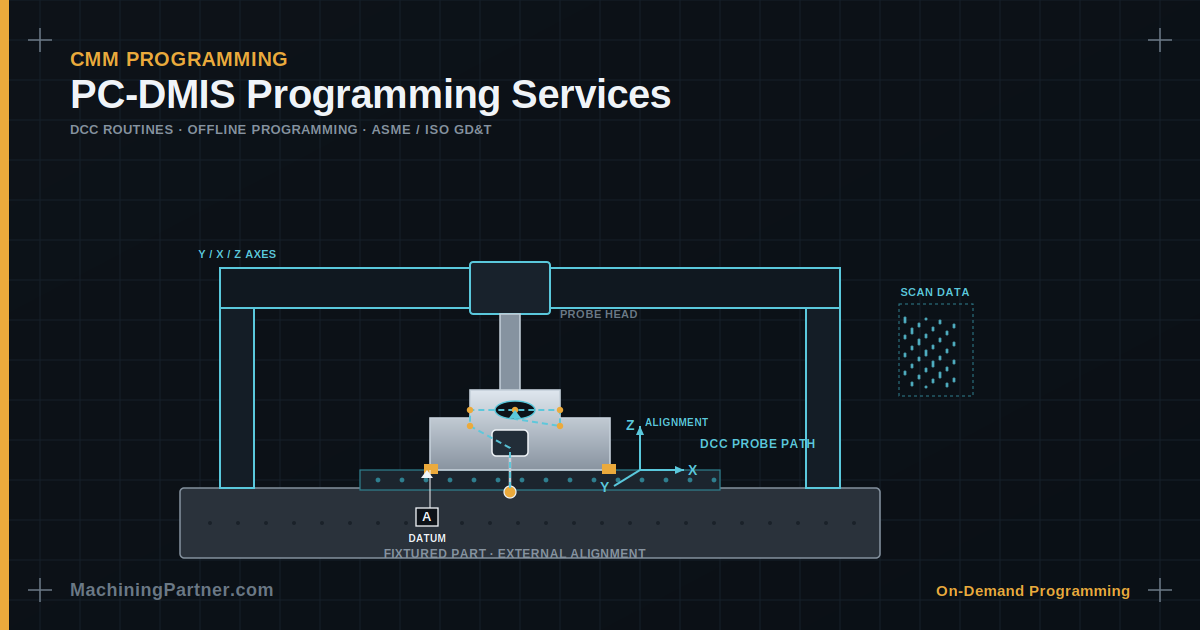
The work splits into two modes that confuse people new to it. Manual mode is hand-driving the probe to take hits, often on a manual CMM. DCC mode (Direct Computer Control) is where the machine moves itself through a programmed path on a motorized CMM — and that’s where the real programming lives. A DCC routine has to handle alignment, clearance moves, prehits and retracts, and collision avoidance so the program runs unattended, batch after batch, without a person babysitting it.
What goes into a production-ready PC-DMIS program
1. A solid alignment — the foundation everything sits on
Nothing downstream is correct if the alignment is wrong. Establishing the datum reference frame — level, rotate, origin — in the right order and against the right features is the single most important thing in the routine. Experienced programmers also build in a fast “find the part” pre-alignment before the real one, because some parts are far too small to assume they’re exactly where they should be. That defensive step is the difference between a probe that finds the part and a probe that snaps off because an operator loaded the fixture slightly off.
2. Fixturing and external alignments for hands-off runs
If the goal is a routine that runs with no operator input, the fixture has to locate the part the same way every time. A common professional approach: mount a modular base plate permanently to the granite, align that plate once, save it as an external alignment, and recall it at the start of every part program. The routine then drops straight into DCC after a quick part-find. This is exactly the kind of setup knowledge that separates a robust program from one that crashes the first time a different operator runs it.
3. CAD-based programming — or clean nominals without it
PC-DMIS was the first CMM software to use CAD models in inspection, and with CAD++ a programmer can point-and-click features directly off the solid model, animate the probe path, and let the software auto-detect collisions with the part and fixtures before anything moves. But plenty of shops still program without CAD — from a 2D print — and that’s a real skill of its own: keying in clean nominals, getting vectors right, and reading the drawing for the designer’s true intent. We do both, because your reality might be a pristine STEP model or a coffee-stained blueprint.
4. GD&T evaluated to the correct standard
PC-DMIS carries a comprehensive GD&T toolset and meets current ISO and ASME standards, and it can import embedded GD&T straight from a 3D model. None of that matters if the callouts are interpreted wrong. Datum reference frames, material condition modifiers, position, and profile all have to be evaluated the way the print intends — per ASME Y14.5 or the relevant ISO standard. Two programmers can measure the same feature and report different numbers purely from interpretation, which is why this belongs with someone fluent in the standard, not just the software.
5. Scanning and multisensor work
For form, profile, and freeform surfaces, CAD++ drives high-speed scanning and laser/optical sensors, capturing dense point data for CAD-to-part comparison rather than a handful of discrete touches. If your part needs surface deviation rather than a few dimensions, the programming approach changes completely, and so does the probe strategy.
Parts waiting on a PC-DMIS routine?
Send us the model or print plus your machine and probe details — we’ll quote it the same day.
Program offline and your CMM never stops measuring
One of the most useful things about PC-DMIS for outsourced work is that it doesn’t require tying up your machine. A PC-DMIS Offline seat creates a full virtual environment — a digital twin of the part model, the probe, and the specific CMM, including its kinematics — so a complete routine can be written and simulated without occupying the CMM at all. Your machine stays free to run parts, the program is proven in simulation before it touches real hardware, and the finished routine is validated against your actual machine’s behavior.
That offline-first workflow is what makes remote programming practical and safe. We build and simulate the routine offline, then either deliver it for you to run or connect to your machine for prove-out — your call.
Your data stays on your network
The reasonable worry with outside CMM programming is that your prints and models are sensitive. The way this works in practice keeps them in your hands. We program either fully offline from a model or print you provide, or over a secure remote session to your own PC-DMIS computer — using your VPN or a tool like TeamViewer — with the finished routine saved straight to your system. Files never leave your facility, you can watch the session live, and you can revoke access at any time. For work a client flags as ITAR/EAR-controlled, on-site programming is available so export-controlled data never moves at all.
When to bring in PC-DMIS programming support
- Your programmer left or is out and the CMM is sitting idle while parts wait.
- You have an inspection backlog stalling production behind it.
- A first article (AS9102) is due and it needs to be programmed and reported correctly the first time.
- A complex CAD-based or scanning part exceeds your team’s comfort with CAD++.
- You’re programming from a 2D print and need clean nominals and vectors you can trust.
- Demand spiked — you need capacity this month without a permanent hire.
Frequently asked questions
Do you program offline or on our machine?
What PC-DMIS versions do you support?
Can you work from a 2D print instead of a CAD model?
How do you make sure the probe won’t crash?
Clear your PC-DMIS backlog without a new hire.
Expert routines, programmed offline or on your machine, starting in as little as 24 hours.