Building a custom drill cycle in a Mastercam post processor is one of those tasks that should take an afternoon but ends up eating three days. The documentation is thin, the error messages are cryptic, and the forums have half-answers scattered across threads from 2012. This guide puts it all in one place — every step, every gotcha, tested and working.
If you’ve landed here because you’re seeing “CUSTOMIZABLE DRILL CYCLE” in your NC output instead of actual G-code — you’re in the right place. That’s one of five common failure points covered below. We’ll also build a complete gun drill entry cycle with absolute Z coordinates, full spindle and coolant control, and 8 editable parameters per operation directly in Mastercam’s drilling dialog.
What We’re Building
The specific cycle we’re building is a GunDrill ABS Entry cycle — designed for deep holes that already have a pilot bore. Think gun drilling, long-reach carbide drills, or any situation where you need to enter an existing hole carefully before running at full speed and coolant pressure.
The reason all depths are absolute Z values (not incremental) is safety and clarity. Incremental or hard-coded depths break the moment your stock location changes. With absolute coordinates every programmer looking at the NC file knows exactly where the tool is going — no math, no guessing.
The cycle logic, step by step:
- Rapid to XY, then stop spindle and coolant — never enter a pilot bore with coolant blasting, it forces debris deeper into the hole
- Start at low entry RPM (e.g. S50) and feed slowly into the existing pilot — no coolant yet
- Once safely seated in the pilot, fire up full spindle speed + flood coolant
- Feed through to final depth in one or two passes with a semi-finish transition zone
- At the bottom: spindle stops, but coolant stays ON — it flushes chips back up the hole during retract
- Retract at low RPM back to pilot entrance, coolant OFF when back in clean bore
- Exit at high feed rate — no G0 inside the hole, ever
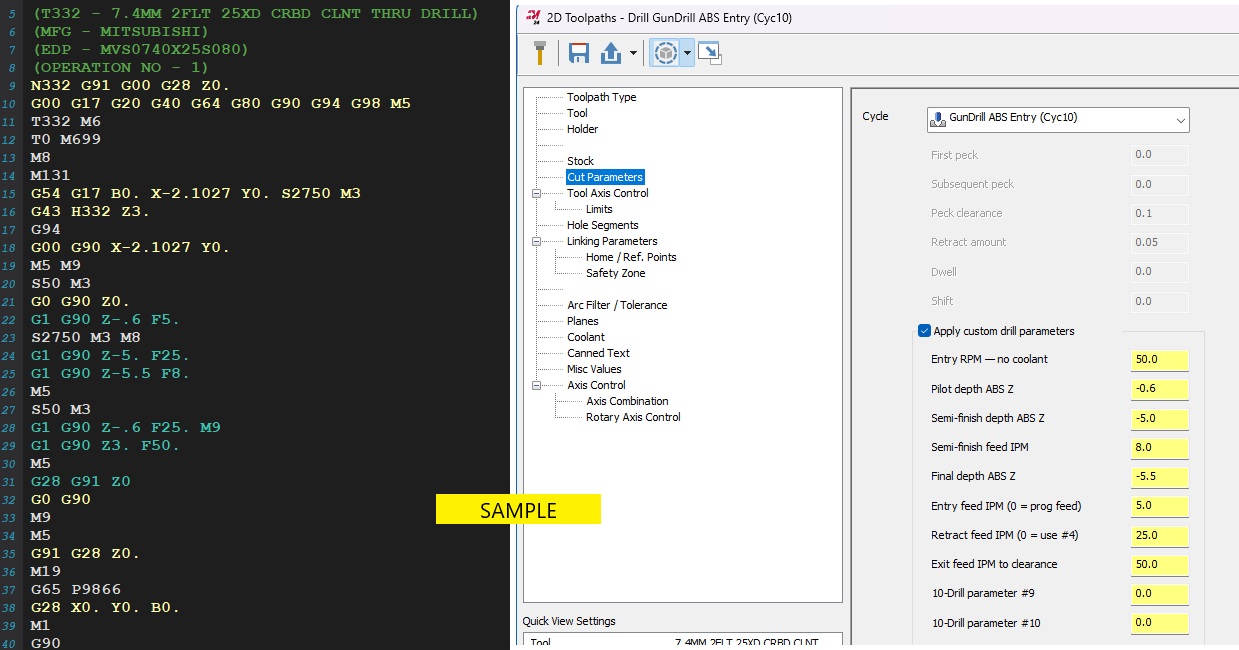
All 8 parameters — RPM, depths, feeds — are set per operation in the Mastercam drilling dialog and print as a reference comment at the top of each hole’s G-code.
Step 1 — Add the Cycle Name to the XML
Every modern Mastercam post processor (.pst file) has a large XML block at the bottom that drives the Mastercam UI — the cycle dropdown names, field labels, parameter descriptions. Open your .pst in a text editor, scroll to the bottom past all the post code, and find the <drill_cycle_10> tag. It’ll be blank or contain a space. Replace the whole block with this:
You must include all those child tags (<dwell>, <first_peck>, etc.) even as empty strings. Without them Mastercam silently ignores the entry and shows a blank line in the dropdown. This is undocumented behavior that costs hours to discover.
<!-- Find this block in the XML section of your .pst file -->
<drill_cycle_10>
  <description>
    <text>GunDrill ABS Entry (Cyc10)</text>
  </description>
  <dwell><text>""</text></dwell>
  <first_peck><text>""</text></first_peck>
  <subsequent_peck><text>""</text></subsequent_peck>
  <peck_clearance><text>""</text></peck_clearance>
  <retract_amount><text>""</text></retract_amount>
  <shift><text>""</text></shift>
</drill_cycle_10>

<!-- Also update the drill_cycle_descriptions section further down -->
<custom_drill_10>
  <text>GunDrill ABS Entry (Cyc10)</text>
</custom_drill_10>
Step 2 — The drillcyc$ Offset Gotcha (This One Costs a Full Day)
Here’s the thing nobody writes down. The XML numbering and the internal drillcyc$ post variable are off by one. Always. If you use the wrong number, the post silently falls through to the default else branch and writes CUSTOMIZABLE DRILL CYCLE into your NC file with no error, no warning. Just wrong output. Maddening to debug.
| XML Tag | drillcyc$ Value | Shows As |
|---|---|---|
<drill_cycle_9> | drillcyc$ = 8 | Custom cycle 9 |
<drill_cycle_10> | drillcyc$ = 9 | Custom cycle 10 |
<drill_cycle_11> | drillcyc$ = 10 | Custom cycle 11 |
So in your pdrlcst$ postblock, you check for drillcyc$ = 9 — not 10. Easy to get right once you know. Impossible to find if you don’t.
If you see CUSTOMIZABLE DRILL CYCLE X... Y... Z... in your NC file, this is almost always the reason. Wrong drillcyc$ number. The cycle is selected correctly in Mastercam — the post just isn’t catching it.
Step 3 — Declare Your Working Variables
MP post processors require a fmt declaration for any variable you intend to output or read back. Find the section in your .pst where the existing drl_prm format lines live and add these four lines right below them:
# GunDrill ABS Entry Cycle 10 - working output variables
fmt  "Z" 2  gd10_pilot_z    #Abs Z output - Pilot depth (e.g. Z-.600)
fmt  "Z" 2  gd10_semifin_z  #Abs Z output - Semi-finish depth
fmt  "Z" 2  gd10_final_z    #Abs Z output - Final depth
fmt      4  gd10_full_speed  #Saved full programmed RPM (integer)
The "Z" 2 format is important — it means the variable outputs with a Z prefix baked in. So when you write *gd10_pilot_z in the post code, the NC file gets Z-.600. Without the Z prefix in the format you’d have to concatenate it manually and risk spacing issues. The gd10_full_speed variable is declared with fmt 4 (integer) because it stores the programmed spindle RPM, which we save before overriding it with the low entry RPM — and need to restore later.
Never put a # comment on the same line as an assignment in an MP post. Writing gd10_full_speed = speed #Save RPM causes a “Label has not been defined” post error because the parser interprets #Save as a label reference. Always put comments on their own dedicated line.
Step 4 — The pdrlcst$ Postblock
The pdrlcst$ postblock is where Mastercam sends all custom drill cycles (cycles 8 through 19). It already exists in your post — you’re adding a new branch inside it. The structure nests our cycle 10 logic inside an else off the existing cycle 8 (Subprogram Call) handler, with a final fallback else that outputs the default text for any other custom cycles you haven’t defined yet.
pdrlcst$        #Custom drill cycles 8 - 19 (user option)
      pdrlcommonb
      if not(machsimflg),
        [
        if drillcyc$ = 8,
          [
          #--- Cycle 9: Subprogram Call (existing code) ---
          sub_prg_call = peck1$
          pcan1, pbld, pn, *sg00, *sgabsinc, pfxout, pfyout, pfaout, pfcout, strcantext, pe
          pbld, pn, "M98", *sub_prg_call, pe
          ]
        else,
          [
          if drillcyc$ = 9,      # <-- XML drill_cycle_10 = drillcyc$ 9 (offset!)
            [
            #==========================================================
            # CYCLE 10: GUNDRILL ABS ENTRY - All Absolute Z Values
            #==========================================================
            # drl_prm1$  Entry RPM (no coolant during pilot entry)
            # drl_prm2$  Pilot Depth Abs Z    (e.g. -.600)
            # drl_prm3$  Semi-Finish Depth Abs Z
            # drl_prm4$  Semi-Finish Feed IPM
            # drl_prm5$  Final Depth Abs Z
            # drl_prm6$  Entry Feed IPM  (0 = use programmed feed)
            # drl_prm7$  Retract Feed IPM (0 = use semi-finish feed)
            # drl_prm8$  Exit Feed IPM to clearance (no G0 in hole)
            #==========================================================

            #-- Assign output variables and save full RPM --
            gd10_pilot_z   = drl_prm2$
            gd10_semifin_z = drl_prm3$
            gd10_final_z   = drl_prm5$
            gd10_full_speed = speed

            #-- Parameter reference comment in G-code output --
            pbld, pn, scomm_str, "GD10 GUNDRILL ABS ENTRY - PARAMETER REFERENCE", scomm_end, pe
            pbld, pn, scomm_str, "P1 ENTRY RPM  NO CLNT  :", !drl_prm1$, scomm_end, pe
            pbld, pn, scomm_str, "P2 PILOT DEPTH ABS Z   :", !drl_prm2$, scomm_end, pe
            pbld, pn, scomm_str, "P3 SEMIFIN DEPTH ABS Z :", !drl_prm3$, scomm_end, pe
            pbld, pn, scomm_str, "P4 SEMIFIN FEED IPM    :", !drl_prm4$, scomm_end, pe
            pbld, pn, scomm_str, "P5 FINAL DEPTH ABS Z   :", !drl_prm5$, scomm_end, pe
            pbld, pn, scomm_str, "P6 ENTRY FEED IPM      :", !drl_prm6$, "[0=PROG FEED]", scomm_end, pe
            pbld, pn, scomm_str, "P7 RETRACT FEED IPM    :", !drl_prm7$, "[0=USE P4]", scomm_end, pe
            pbld, pn, scomm_str, "P8 EXIT FEED IPM       :", !drl_prm8$, scomm_end, pe

            #-- Step 1: XY rapid position --
            pcan1, pbld, pn, *sg00, *sgabsinc, pfxout, pfyout, pe

            #-- Step 2-3: Stop spindle and coolant, set entry RPM --
            pbld, pn, "M5", "M9", pe
            speed = drl_prm1$
            pbld, pn, *speed, "M3", pe

            #-- Step 4: Rapid to top of stock --
            pbld, pn, "G0", "G90", *drl_tos_zabs, pe

            #-- Step 5: Feed to pilot depth, no coolant --
            if drl_prm6$ <> 0, feed = drl_prm6$
            pbld, pn, "G1", "G90", *gd10_pilot_z, *feed, pe

            #-- Step 6: Full RPM + coolant ON --
            speed = gd10_full_speed
            pbld, pn, *speed, "M3", "M8", pe

            #-- Step 7: Feed to semi-finish depth --
            if drl_prm7$ <> 0, feed = drl_prm7$
            else, feed = drl_prm4$
            pbld, pn, "G1", "G90", *gd10_semifin_z, *feed, pe

            #-- Step 8: Feed to final depth at programmed feed --
            feed = fr_pos$
            pbld, pn, "G1", "G90", *gd10_final_z, *feed, pe

            #-- Step 9-10: Spindle OFF only — coolant stays ON to flush chips --
            speed = drl_prm1$
            pbld, pn, "M5", pe
            pbld, pn, *speed, "M3", pe

            #-- Step 11: Feed retract — coolant OFF when back in pilot --
            if drl_prm7$ <> 0, feed = drl_prm7$
            else, feed = drl_prm4$
            pbld, pn, "G1", "G90", *gd10_pilot_z, *feed, "M9", pe

            #-- Step 12: High feed exit — NO G0 inside hole --
            feed = drl_prm8$
            pbld, pn, "G1", "G90", *drl_init_zabs, *feed, pe
            pbld, pn, "M5", pe
            pbld, pn, "G28", "G91", "Z0", pe
            pbld, pn, "G0", "G90", pe
            ]
          else, "CUSTOMIZABLE DRILL CYCLE ", pfxout, pfyout, pfzout, pdepth, pe
          ]
        ]
      else, pmachsim_drl_cst
      pcom_movea
One more thing — find the pcanceldc$ postblock and update its G80 output condition. This cycle is not a true canned cycle, so you don’t want a spurious G80 appearing after it in the NC file:
# Exclude cycles 8 and 9 from G80 output — they are not true canned cycles
if drillcyc$ <> 8 & drillcyc$ <> 9, pcan1, pbld, pn, "G80"
Step 5 — Setting the 8 Parameters in Mastercam
In the Cut Parameters tab of your drilling operation, choose GunDrill ABS Entry (Cyc10) from the Cycle dropdown, then check Apply custom drill parameters to reveal the 10 parameter fields. The labels will say “10-Drill parameter #1” through “#10” — that’s a Mastercam limitation covered in the next section. Here’s what each field actually does:
| Field | Purpose | Example (4″ deep / .600 pilot) |
|---|---|---|
| 10-Drill parameter #1 | Entry RPM — no coolant | 50 |
| 10-Drill parameter #2 | Pilot depth ABS Z | -0.600 |
| 10-Drill parameter #3 | Semi-finish depth ABS Z | -3.500 |
| 10-Drill parameter #4 | Semi-finish feed IPM | 5.0 |
| 10-Drill parameter #5 | Final depth ABS Z | -4.000 |
| 10-Drill parameter #6 | Entry feed IPM (0 = prog feed) | 3.0 |
| 10-Drill parameter #7 | Retract feed IPM (0 = use #4) | 5.0 |
| 10-Drill parameter #8 | Exit feed IPM to clearance | 50.0 |
Real G-Code Output — 7.4mm Carbide Through-Coolant Drill, .600 Pilot
Here’s actual output from a Mazak HCN 8800 — 7.4MM 25XD carbide drill (Mitsubishi MVS0740X25S080), S2750 full RPM, pilot at Z-.6, semi-finish at Z-5., final depth Z-5.5, clearance Z3.0. The cycle handles the full entry sequence cleanly, no manual G-code editing required:
(T332 - 7.4MM 2FLT 25XD CRBD CLNT THRU DRILL)
(MFG - MITSUBISHI)
(EDP - MVS0740X25S080)
(OPERATION NO - 1)
N332 G91 G00 G28 Z0.
G00 G17 G20 G40 G64 G80 G90 G94 G98 M5
T332 M6
T0 M699
M8
M131
G54 G17 B0. X-2.1027 Y0. S2750 M3  ; tool on, full RPM approach
G43 H332 Z3.
G94
G00 G90 X-2.1027 Y0.               ; rapid to hole XY
M5 M9                               ; spindle off, coolant off
S50 M3                              ; entry RPM — no coolant
G0 G90 Z0.                          ; rapid to top of stock
G1 G90 Z-.6 F5.                     ; feed into pilot at S50, no coolant
S2750 M3 M8                         ; FULL RPM + COOLANT ON (safely in pilot)
G1 G90 Z-5. F25.                    ; semi-finish zone
G1 G90 Z-5.5 F8.                    ; final depth at programmed feed
M5                                  ; SPINDLE OFF — coolant stays ON, flushing chips
S50 M3                              ; low retract RPM, coolant still on
G1 G90 Z-.6 F25. M9                 ; retract to pilot entrance — COOLANT OFF HERE
G1 G90 Z3. F50.                     ; HIGH FEED exit — no G0 in the hole
M5
G28 G91 Z0
G0 G90
M9
M5
G91 G28 Z0.
M19
G65 P9866
G28 X0. Y0. B0.
M1
Can You Rename the “10-Drill parameter #N” Labels?
Yes — but not through the post processor. This trips everyone up because the <drill_cycle_10_custom_parameters> XML section in the .pst looks like it should support parameter labels. It doesn’t. There are no valid <param_1> tags in Mastercam’s XML schema — invent them and they’re silently ignored.
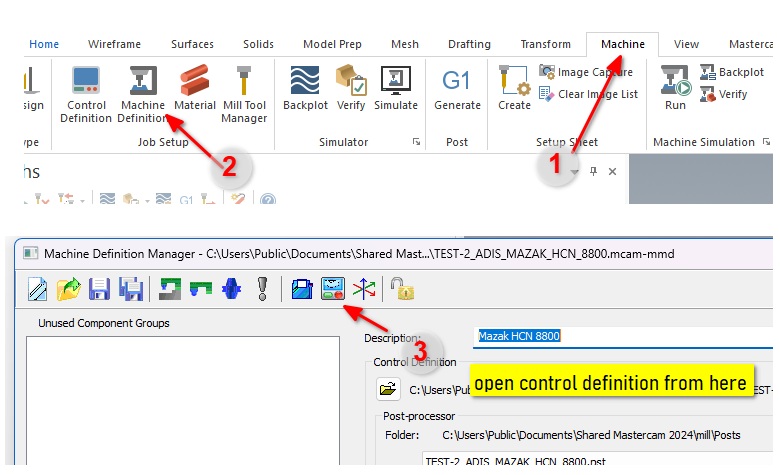
The actual place to rename them is the Mastercam Control Definition (.mcam-control file). Here’s exactly how to do it:
In Mastercam, go to Machine → Machine Definition Manager and open your machine’s Control Definition (.mcam-control file)
In the left panel under Control topics, expand Text and click Mill Custom Drill Parameters
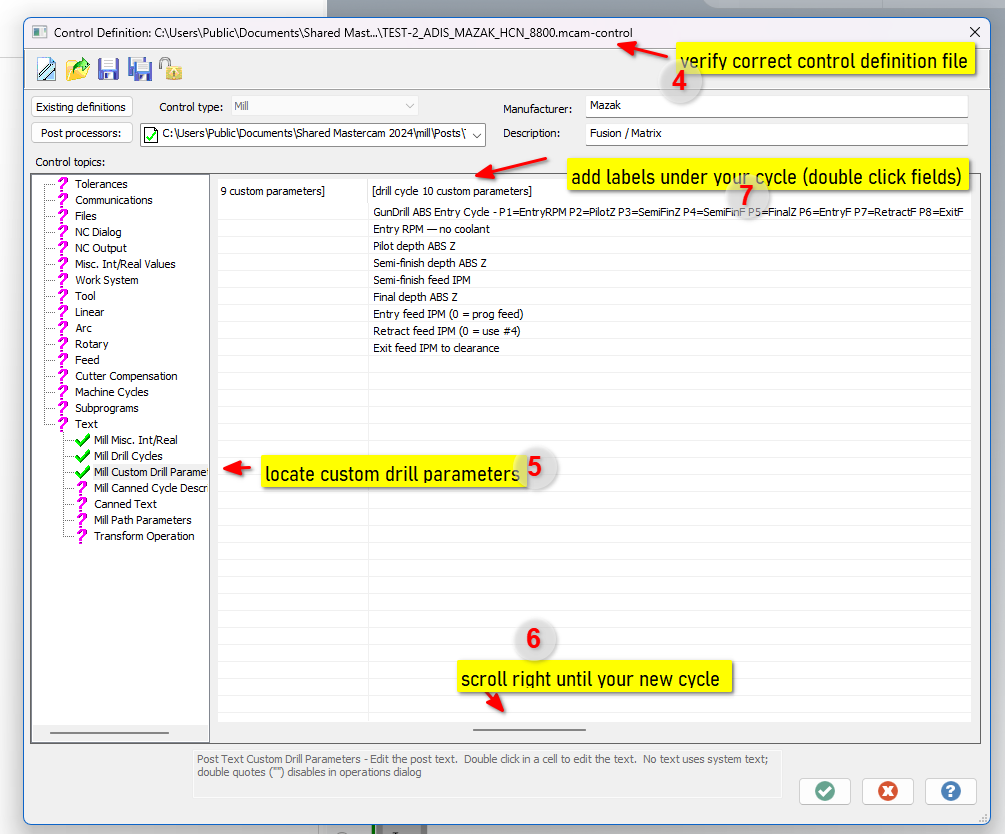
Scroll right across the columns until you find [drill cycle 10 custom parameters]
In the Description row, type a short cycle summary — this appears as the column header tooltip
Double-click each Parameter cell to edit — type your label for P1 through P8 (e.g. “Entry RPM — no coolant”, “Pilot depth ABS Z”, etc.)
Click the green checkmark to save the Control Definition
Reopen your drilling operation — the parameter fields now show your custom labels instead of “10-Drill parameter #N”
The catch: this only applies to your specific .mcam-control file. If you’re building a post for someone else’s machine or distributing to multiple shops, they won’t have your Control Definition — they’ll still see the generic “10-Drill parameter #N” labels. Two practical solutions:
- For your own shop / private machine setup — edit the Control Definition. Takes five minutes and works perfectly, as shown above.
- For shared posts or distribution — use the parameter reference comment block in the G-code output (built into the cycle above). Every hole documents itself: operator, setup person, and future programmer all see the parameter names right there in the NC file without needing anything else.
Common Errors — Quick Reference
Every one of these was discovered the hard way. Bookmark this table:
| Error / Symptom | Root Cause | Fix |
|---|---|---|
| CUSTOMIZABLE DRILL CYCLE in NC output | drillcyc$ = 10 instead of 9 | Use drillcyc$ = 9 |
| Cycle shows blank in dropdown | Missing sub-elements in <drill_cycle_10> | Add <dwell>, <first_peck> etc. as empty strings |
| PST LINE XXXX Label not defined | Inline # comment after code on same line | Move comment to its own line |
| PST LINE XXXX formula failed | Variable used without fmt declaration | Add fmt 4 gd10_full_speed |
| Spurious G80 after custom cycle | pcanceldc$ outputs G80 for all cycles | Add & drillcyc$ <> 9 to the G80 condition |
Need a Custom Post Built For Your Machine?
We build and modify Mastercam post processors for HMCs, VMCs, and multi-axis machines. Custom drill cycles, specialized canned cycles, machine-specific output — handled remotely, fast.
See Mastercam Post Services →